
Browser-based BIM viewer performance: 10 factors that affect large IFC models
Thinkproject VDC Collaboration — Technical Guide
Browser-based BIM viewers make it easier for project teams to access and review complex 3D models without specialist authoring software. But why do some IFC models load and navigate smoothly while others become slow or unstable?
There is rarely one cause. This guide explores the 10 key factors that have the greatest impact on BIM viewer performance.
What impacts browser-based BIM viewer performance?
Browser-based BIM viewer performance depends mainly on geometry complexity, object count, IFC structure, metadata, federated model size and the user’s hardware and network. Geometry complexity is particularly important: a relatively small IFC file can still perform poorly if it contains highly detailed objects, complex geometry or inefficiently repeated elements. File size alone therefore isn’t a reliable measure of BIM viewer performance.
Understanding these factors helps teams make informed decisions when authoring and publishing models.
10 key factors that influence BIM viewer performance.
1. Geometry Complexity
The most impactful factor. A browser viewer converts all 3D shapes into triangulated meshes before rendering them on screen. The more triangles, the more work the viewer has to do (every frame, every second).
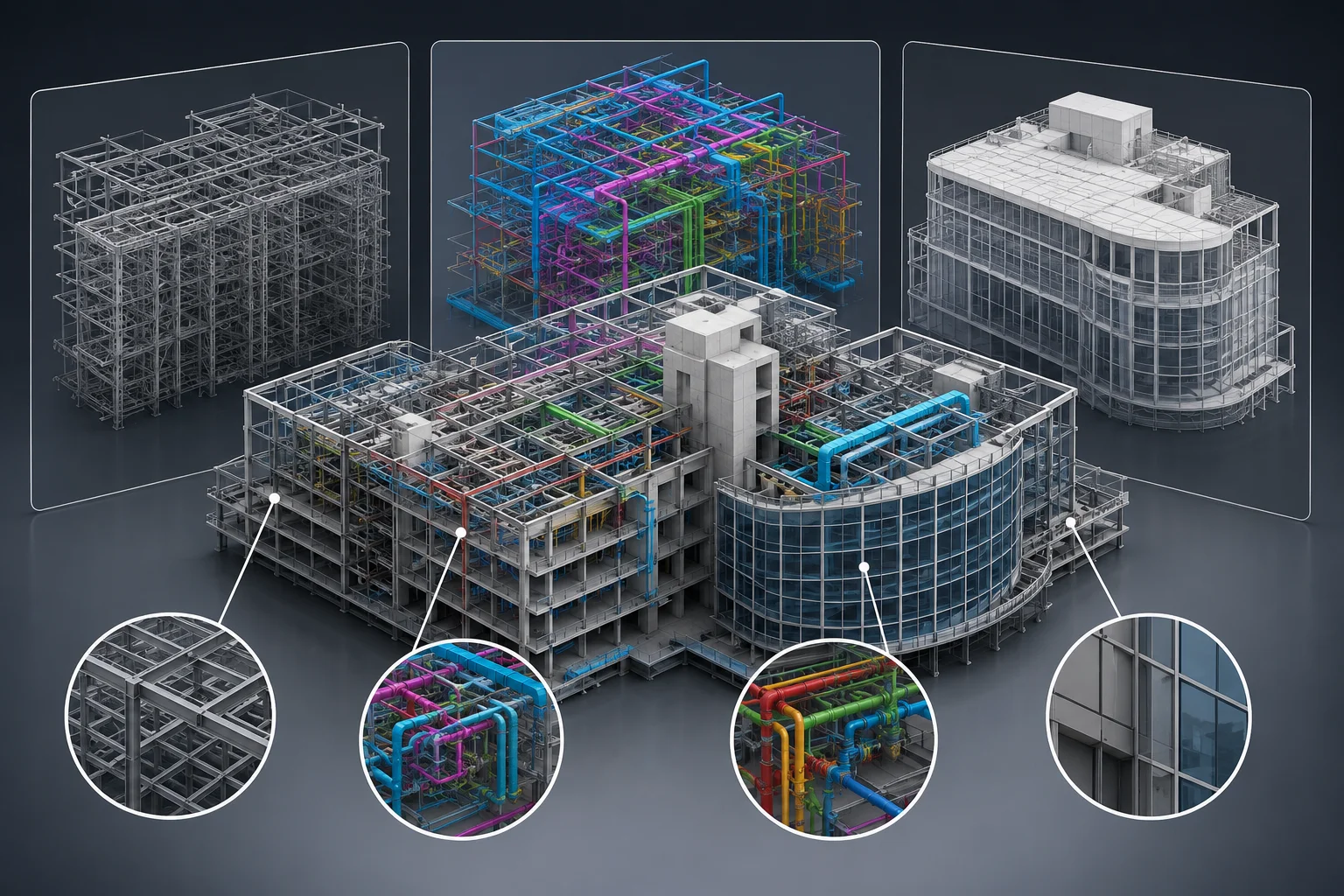
| What drives triangle count | Examples |
|---|---|
Curved surfaces and round profiles | Pipes, ducts, rebar, arches, dome roofs |
Manufacturer-accurate families and objects | A door handle modeled with 800,000 triangles vs a simplified one with 200 |
High arc segmentation settings | A pipe elbow with 64 segments instead of 12 |
Structural rebar modeled in full 3D | Each rebar is a curved cylinder. A reinforced concrete beam can carry millions of triangles |
Organic and freeform geometry | Curved facades, parametric roofs, landscape elements |
Why it matters: A single over-detailed object can stall a viewer that would otherwise handle thousands of simpler elements without issue.
2. Number of Objects in the Scene
Every object in the scene (whether visible or not) consumes memory and CPU resources. The viewer tracks each object’s state, position, properties, and interactions.
- Models with fewer than 10,000 objects: generally smooth
- Models with 50,000–100,000 objects: requires careful optimization
- Models above 100,000 objects: high risk of slowdowns; model splitting is strongly recommended
Key distinction: Object count and triangle count are separate problems. A model with 5,000 objects but highly detailed geometry can be slower than a model with 50,000 simple objects.
3. Geometry Reuse and IFC Instancing
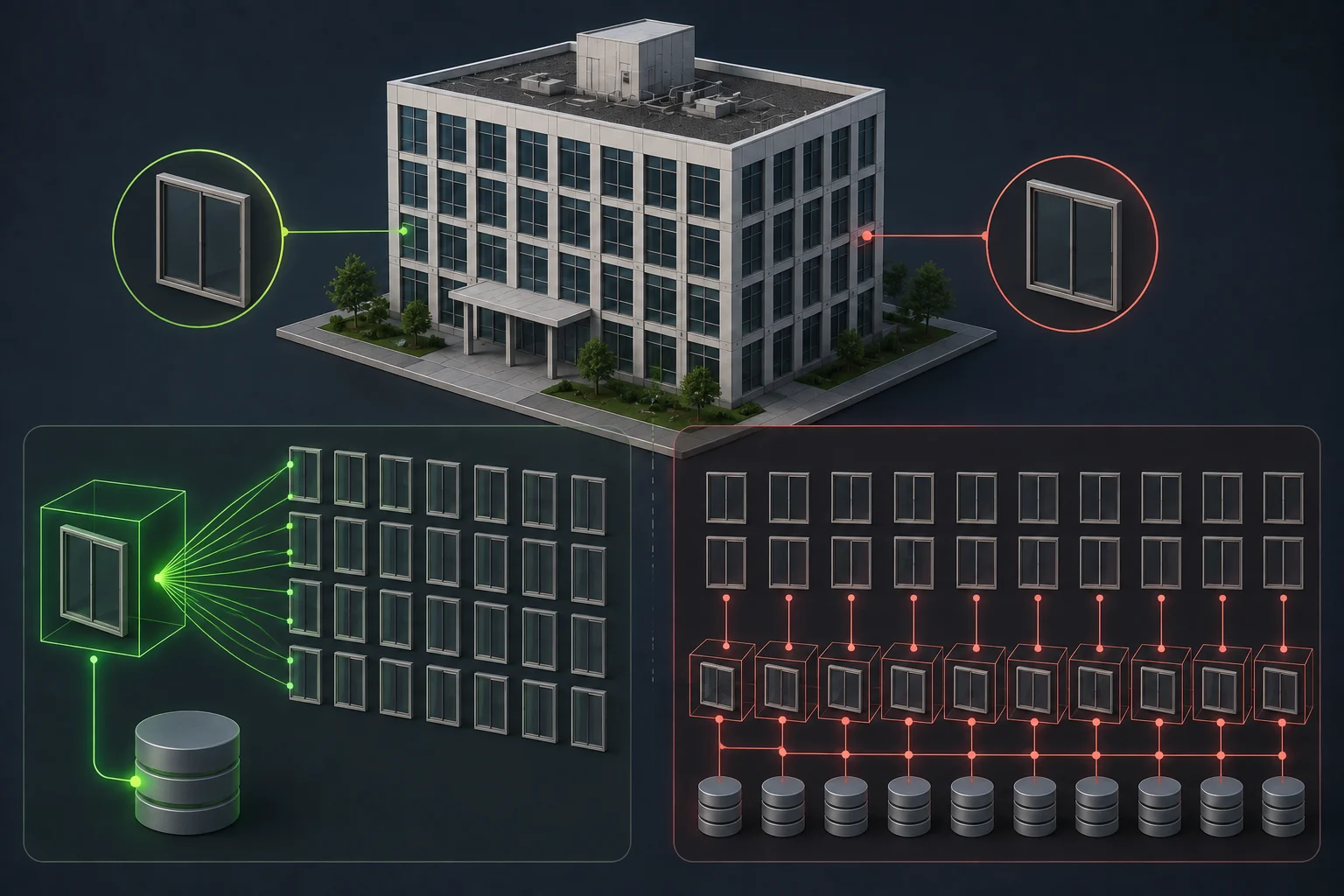
IFC supports shared geometry: if 200 identical columns exist in a building, the geometry can be stored once and referenced 200 times. This is called instancing.
When authoring tools export similar objects as fully independent geometry instead of referenciating the one single geometry representation (no instancing), the file grows proportionally, and the viewer has to process each copy separately.
Impact: A model with 500 identical windows that shares geometry loads significantly faster than the same model where each window has its own (and repetitive) geometry data.
4. IFC File Size and Format
The raw IFC file format (the .ifc text file) is a good interoperability standard but it is not designed for fast browser loading. It is a sequential text format that cannot be streamed: the entire file must be downloaded and processed before anything appears on screen.
Platforms like VDC Collaboration convert IFC files to optimised binary formats internally. But the conversion quality and speed still depend on the source file:
- Large, complex IFC files take longer to convert and produce larger intermediate files
- Files with complex boolean geometry (openings, voids, CSG) require expensive processing
- Files with millions of property values slow down metadata loading
File size thresholds to be aware of:
| Size range | Typical outcome |
|---|---|
Up to ~200 MB | Generally converts and loads smoothly; comfortable range for most discipline models |
~200 MB to ~500 MB | Usually acceptable on platforms with server-side conversion pipelines; performance depends heavily on geometry quality and object count |
~500 MB to ~1 GB | Start of the heavy zone. Consider splitting by zone or floor cluster; feasible on mature platforms with chunked loading, but expect longer conversion and load times |
Above ~1 GB | Splitting is strongly recommended before publishing; technically achievable on advanced platforms via automated chunking and streamed loading, but performance becomes highly sensitive to all other factors |
There is no universal size limit that guarantees good or bad performance. File size is an indicator, not a threshold. A smaller file with a bad structure or a poor geometry quality (over-detailed fittings, no instancing, complex boolean operations) will perform much worse than a larger file with well-structured, simplified geometry. Based on Thinkproject’s experience with multidisciplinary IFC models, the following ranges can be useful as a practical guide. They are not hard technical limits.
5. Amount of Metadata and Properties
Every IFC element can carry property sets (Psets) with dozens of attributes. When all properties are loaded into memory at once, large models with many elements and rich data can spike memory usage significantly.
- A model with 10,000 elements and 5 properties each: low metadata load
- A model with 50,000 elements and 50 properties each: heavy metadata payload
Impact: More metadata means more memory used, longer initial load time, and slower object inspection interactions.
6. Transparent Objects
Transparency (glass, glazing, curtain walls) is expensive to render. The viewer must sort all transparent objects back-to-front every frame to correctly blend them with the scene behind. This prevents several GPU-level optimizations and increases rendering cost significantly.
Facades with full glass curtain walls or large glazed atriums are common performance bottlenecks.

7. Federated Model Complexity
VDC Collaboration allows multiple discipline models to be loaded simultaneously as a federated set. Each model loaded adds its own geometry, objects, metadata, and rendering cost to the session.
Loading all zones at once on a large infrastructure project or all disciplines at once on a large architecture project (architecture + structure + MEP + facades + civil) is the highest-load scenario. The cumulative cost can exceed what any single model would cause alone.
Impact: Federation multiplies every performance factor simultaneously.
8. IFC File Structure Quality
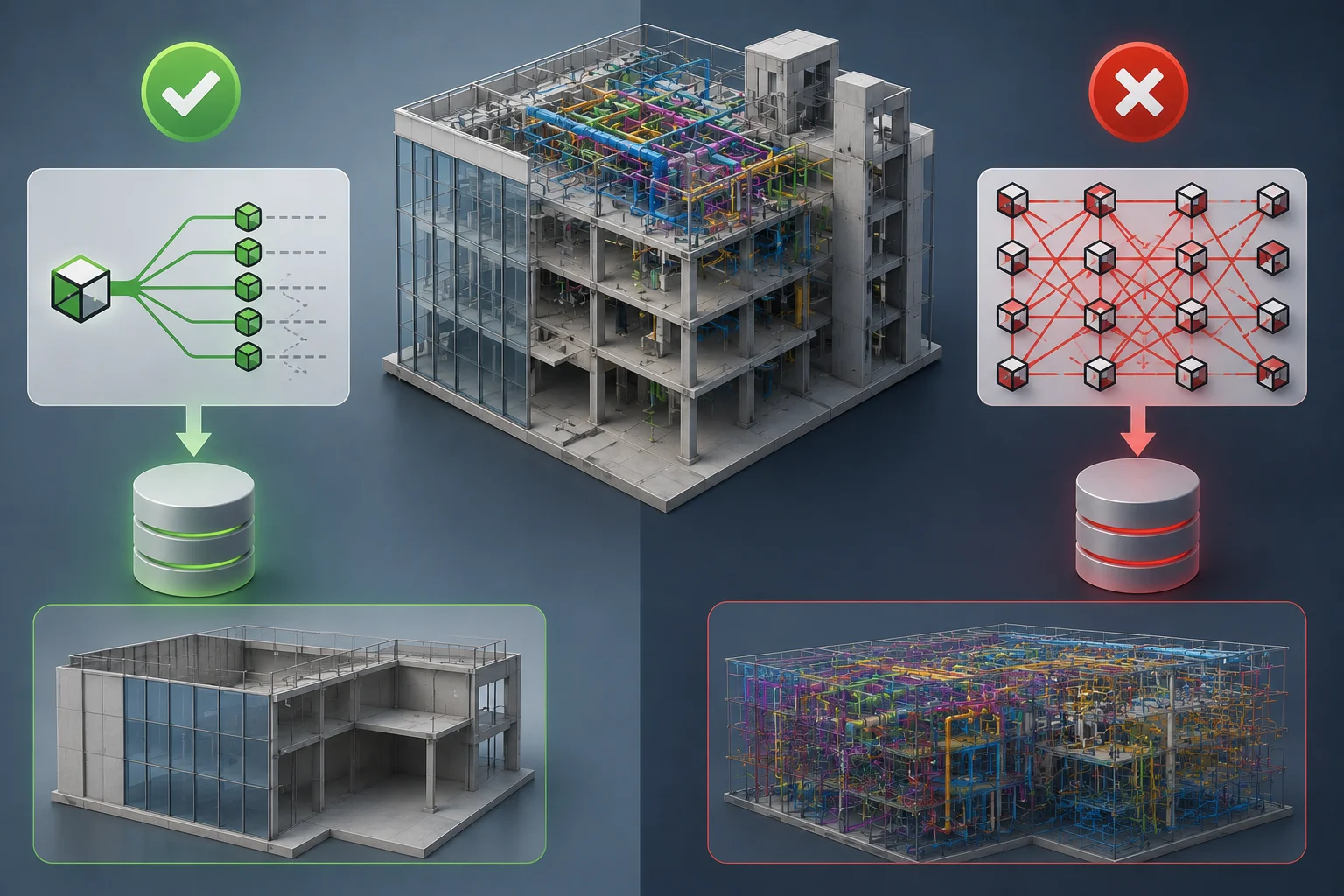
Poorly authored IFC files contain problems that silently degrade performance:
- Duplicate element GUIDs (breaks issue tracking and federation logic)
- Elements not assigned to any building storey (causes misplacement or invisibility)
- Orphaned geometry entities (invisible but still processed)
- Boolean openings evaluated at extremely high precision (expensive to convert)
- Redundant data: the same element described multiple times
Why it matters: These issues are invisible to the eye but fully processed by the viewer engine. They consume conversion time, memory, and CPU without contributing anything visible or useful to the coordination session.
9. Client Hardware
Performance depends significantly on the client device:
- RAM: The browser holds all model geometry in memory before and during rendering: insufficient RAM causes slowdowns or tab crashes. The larger and more complex the models, the more RAM is needed. BIM Experts loading full federated models require significantly more RAM than general stakeholders reviewing a single discipline.
- GPU: Rendering is handled by the graphics card. An integrated GPU (built into the CPU) is sufficient for lightweight review. For large federated models or intensive BIM Expert use, a dedicated GPU significantly improves rendering fluidity and navigation responsiveness (Make sure to activate the GPU usage for your browser).
- CPU: A faster processor reduces the time it takes to parse and prepare model data when a file is first loaded. This affects load time. When choosing or upgrading a workstation, prioritise a higher-performance processor.
What CPU/GPU/RAM should my hardware have for smooth BIM navigation? Check Thinkproject’s Recommendations here.

10. Network and Bandwidth
Model files must be downloaded before rendering starts. Network conditions affect how quickly the session becomes usable:
- Bandwidth: Low bandwidth extends load times, particularly for large or multi-discipline federated sessions.
- Latency: High latency (remote sites, satellite connections, VPN tunnels with poor routing) adds delays to every request, including metadata fetching and on-demand property loading.
- Connection stability: Interrupted downloads can stall or corrupt model loading mid-session.
Key distinction: Network affects how fast the model arrives, hardware affects how fast the model is processed once it has arrived. Both matter, but they act at different stages of the loading sequence.

What Matters Most for Browser-Based BIM Viewer Performance
Browser-based BIM viewer performance is shaped by decisions made long before a file is uploaded, at the authoring stage, in the export settings, and in how federation is scoped. Geometry complexity and IFC file structure quality have the greatest cumulative impact. Hardware and network affect how quickly the model arrives and renders, but they cannot compensate for a poorly prepared source file.
Teams that address geometry detail, instancing, and IFC quality at the authoring stage consistently achieve faster load times, more stable coordination sessions, and a better experience for every stakeholder accessing the federated model.
Explore large BIM models with Thinkproject VDC COLLABORATION
Thinkproject VDC COLLABORATION provides browser-based access to federated multidisciplinary BIM models, helping project teams review and coordinate models without requiring authoring tools. Combined with well-prepared IFC models and the right hardware and network conditions, it gives stakeholders an accessible environment to explore models, inspect object information and manage model-based issues throughout the coordination process.
 About the author: Badr Ouahbi is Product Manager for Thinkproject’s VDC solutions, with expertise in BIM, digital construction and model-based collaboration. He works closely with customers and product teams to develop practical solutions for BIM coordination and complex project delivery.
 Want to see how VDC Collaboration handles large and complex IFC models?
Frequently asked questions about browser-based BIM viewer performance
A slow IFC model can result from high geometry complexity, large object counts, extensive metadata, inefficient IFC structure or multiple federated models being loaded simultaneously. Client hardware and network conditions can also affect performance. File size alone is not a reliable indicator of how well a model will perform.
Yes, but IFC file size is only one factor. A smaller file containing highly detailed geometry, complex boolean operations or inefficiently repeated objects can perform worse than a larger, well-structured model. Geometry complexity, object count, metadata and IFC structure should therefore be considered alongside file size.
Start by reducing unnecessary geometric detail and reviewing how objects are exported. Geometry reuse through instancing can also help when a model contains many identical elements. For very large models, consider splitting or scoping them by discipline, zone or floor rather than loading everything simultaneously.
For very large or complex models, splitting can help reduce the amount of geometry, metadata and objects that need to be loaded at once. However, there is no universal IFC file size at which splitting becomes mandatory. Model structure and geometry complexity can be as important as the raw file size.
IFC file size does not directly represent rendering complexity. A relatively small file can contain highly detailed objects, large numbers of triangles, complex boolean geometry or inefficiently repeated elements. These characteristics can create more processing work than a larger but better-optimised model.
Generally, yes. Each additional model contributes geometry, objects and metadata to the session. Loading several disciplines or zones simultaneously can therefore increase memory, CPU and GPU requirements compared with reviewing a single discipline model.
More resources
-
Blog

BIM
8 best BIM collaboration software systems for construction teams
Read moreExplore the best BIM collaboration software systems, from CDEs and model coordination to issue tracking, document control, field collaboration, and handover.
-
Blog

CDE
AI Search in NextGen CDE: How Thinkproject AI turns governed construction data into confirmed answers
Read moreDiscover how AI search in a NextGen CDE helps construction teams find current, approved project information while preserving permissions and control.
-
Blog

Digitalization
Construction business intelligence: Turning data into better decisions
Read moreLearn how construction business intelligence connects project data, improves reporting and supports better decisions across the asset lifecycle.
-
Blog

Contracts
Best construction contract management software: 11 features to look for
Read moreCompare the key features to look for in construction contract management software, from NEC, JCT and FIDIC workflows to audit trails and risk control.
-
Event

Built Asset Lifecycle Platform
Thinkproject Live London 2026
Register nowDiscover how AI and connected data are helping teams reduce risk, improve control, and make faster, smarter decisions across the project lifecycle.
-
Event

Built Asset Lifecycle Platform
Thinkproject Live Events 2026
Read moreJoin construction, infrastructure, and asset management leaders for a day focused on the future of project and asset delivery.
-
Blog
Contracts
JCT contract types: Choosing and managing the right contract
Read moreCompare the main JCT contract types, understand construction management contracts and learn how to choose and administer the right form.
-
Blog

Built Asset Lifecycle Platform
AI in construction: Uses, benefits and real-world examples
Read moreExplore how AI in construction improves planning, safety, project controls, handover and asset performance across the built asset lifecycle.
-
Blog

Health & Safety
Construction risk management: How to identify, assess and control project risks
Read moreLearn how to identify, assess and control construction risks across cost, safety, contracts, programmes and project information.